Wondering how to order meal on China high speed train on 12306? Read 2026 latest Step-by-Step Guide.
Prerequisites
- Log into your verified real-name account and switch the app language to English
- Hold a valid ticket for G/D high-speed trains (food delivery service is unavailable for regular trains)
- Supported payment methods only: Alipay & WeChat Pay; overseas credit cards are not accepted
- Place your order at least 60 minutes before your train arrives at the delivery station
Part 1: Order Takeout from Station Restaurants (Meals delivered from station shops when the train stops)
Step 1: Switch to English Mode
- Open the official 12306 App
- Tap the language switch icon on the top navigation bar
- Select English to enter the English interface
Step 2: Enter the Food Ordering Portal
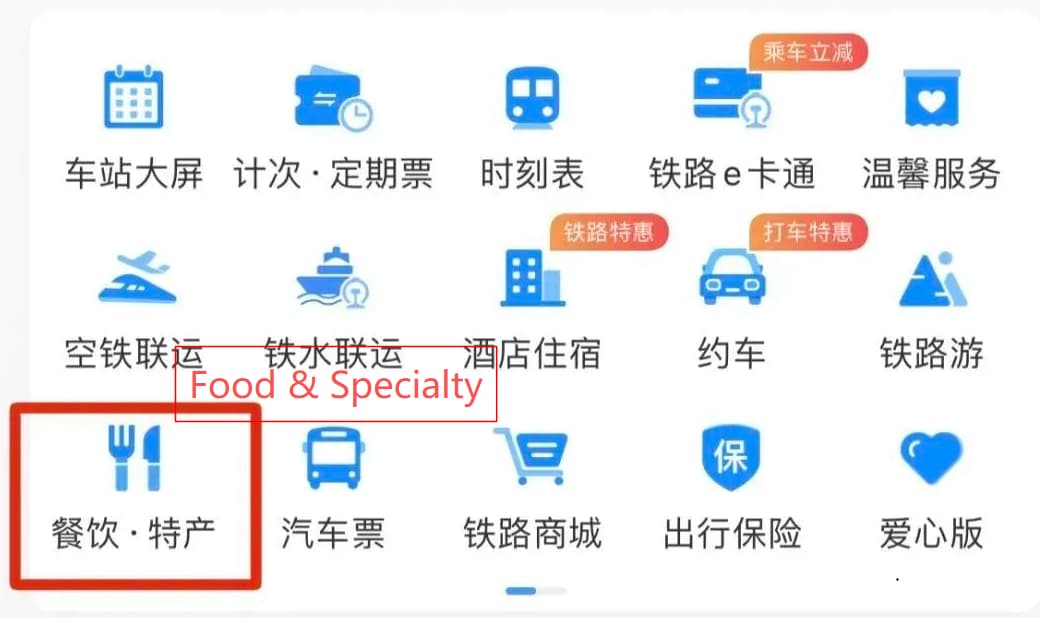
- On the homepage, locate and tap the function entry labeled Food & Specialty
- You will be redirected to the meal booking page
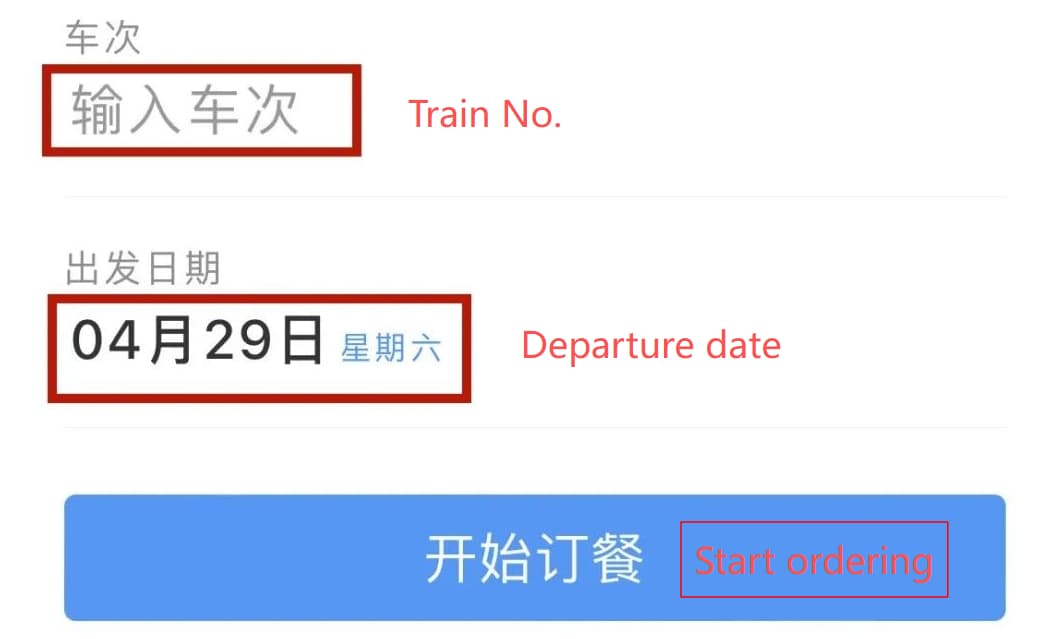
Step 3: Fill in Your Train Trip Information
- Input your train number in the box marked Train No. (e.g. G102, D22)
- Pick your travel date via the calendar selector Travel Date
- Confirm the departure station and arrival station match your ticket
- Tap the blue button Start Ordering to proceed
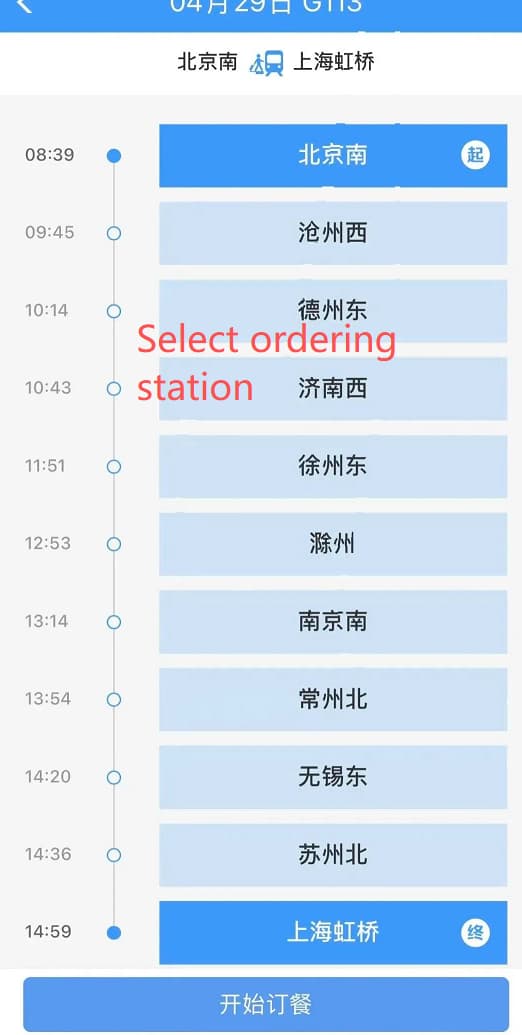
Step 4: Select a Delivery Station
The page displays all stations along your route that support food delivery:
- Tap one station as your delivery stop
- Two catering categories are available:
- Station Restaurants: Chain restaurants and local food stores from the station
- Train Self-operated Meals: Box meals provided by the train dining car
Step 5: Add Dishes to Shopping Cart
- Browse menus of selected restaurants, check food prices and delivery windows
- Tap Add to Cart next to each dish you want to order
- Tap the input box labeled Remarks to leave special requests (e.g. No coriander, Less spicy)
- After selecting all items, tap Check Out to settle your cart
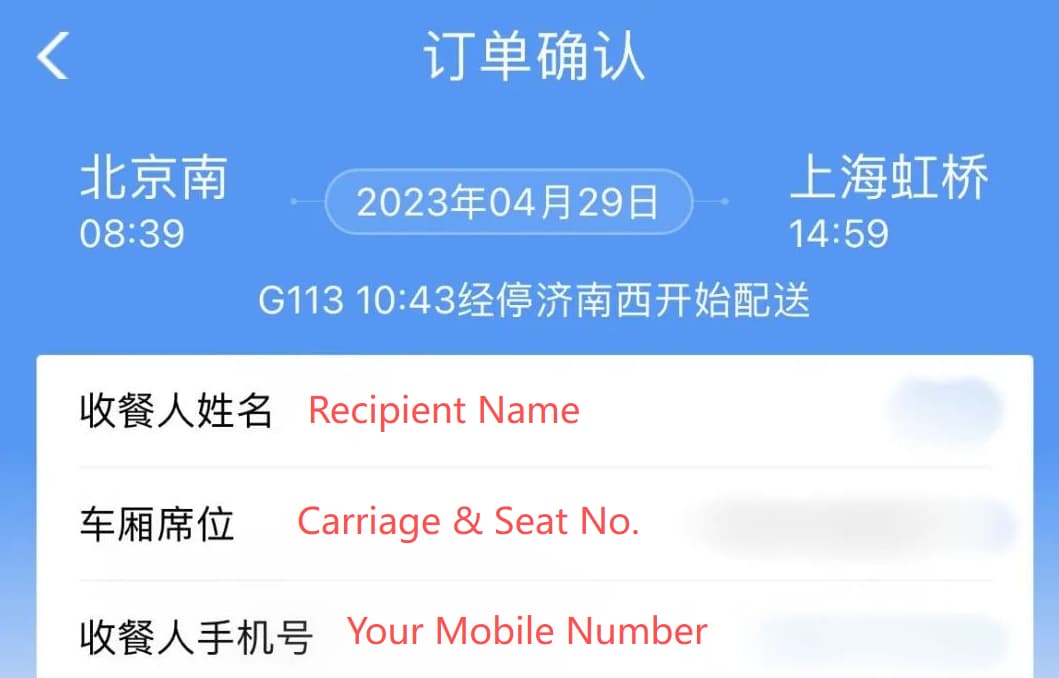
Step 6: Fill in Passenger & Seat Details
- Recipient Name: Enter the full name identical to your train ticket
- Carriage & Seat No.: Fill in your carriage number and seat number (e.g. Car 05, Seat 08A)
- Mobile Number: Input a valid Chinese mobile number to receive order notifications
- Check the free cancellation deadline shown on the page
Step 7: Submit Order & Complete Payment
- Double-check all order information, then tap Submit Order
- Choose one available payment channel:
- Alipay
- WeChat Pay
- Finish payment within 10 minutes; unpaids orders will be cancelled automatically
Step 8: Track Orders & Receive Meals
- After successful payment, train attendants will deliver your food directly to your seat when the train stops at the chosen station
- To view history orders: Return to Food & Specialty page → tap My Food Orders
- Free cancellation: Enter your order page and tap Cancel before the 60-minute cut-off time
Part 2: Order Train Self-operated Meals (Meals supplied directly by the on-board dining car, no station stop required)
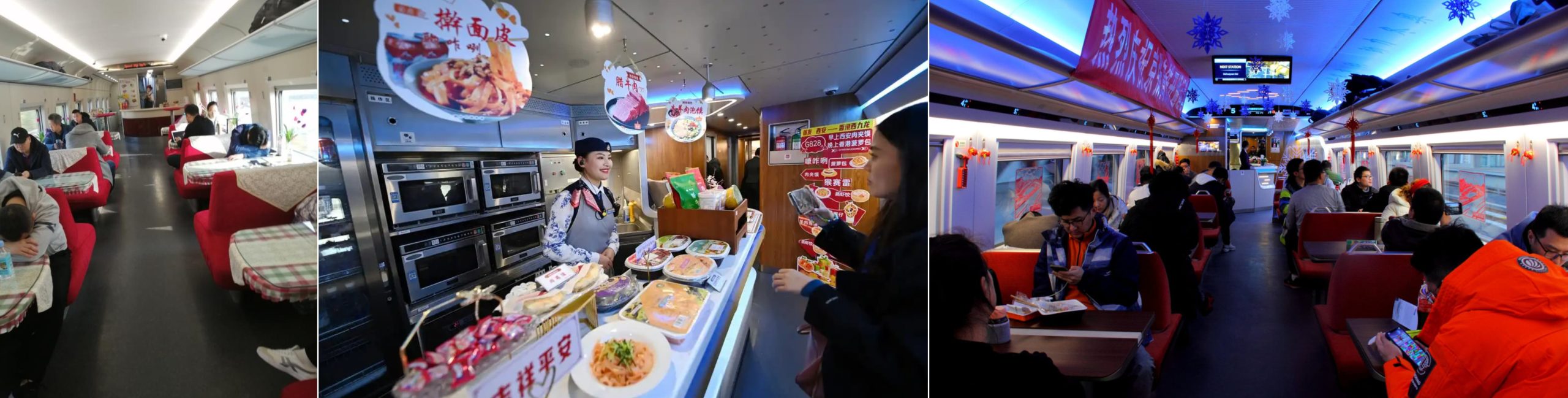
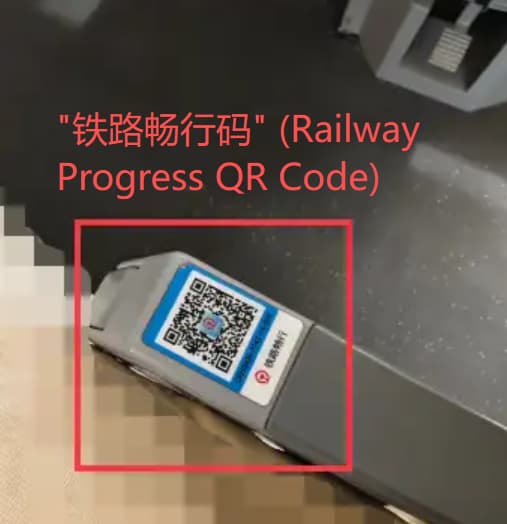
Aside from ordering food delivered from railway stations, you can purchase meals directly supplied by the on-board dining car via the 12306 App. Launch the 12306 App, navigate to the “Food & Specialty” section, then choose the “Train Self-operated Meals” category to browse available onboard dishes. Another convenient option is to scan the “铁路畅行码” (Railway Progress QR Code) printed on your seat armrest or tray table using WeChat Pay or Alipay for instant onboard food orders.
Step 1: Repeat the same operations as Part 1 or scan the “铁路畅行码” (Railway Progress QR Code) printed on your seat armrest or tray table
- Switch App language to English
- Tap homepage Food & Specialty
- Fill in Train No. + Travel Date, tap Start Ordering
- Or just scan the “铁路畅行码” (Railway Progress QR Code)
Step 2: Skip station selection & open Train Self-operated Meals
- Ignore the station list on the page
- Directly tap the tab named Train Self-operated Meals on the top menu bar
- The system will automatically load all box meals and set menus offered by your train’s dining car
Step 3: Add On-board Meals to Cart
- Browse all self-operated set meals, soups and snacks with prices
- Tap Add to Cart for your preferred food items
- Write special diet requests in the Remarks box if needed
- Tap Check Out to go to settlement page
Step 4: Fill in Seat & Contact Information
- Recipient Name: Match the name printed on your train ticket
- Carriage & Seat No.: Input your exact carriage and seat number
- Mobile Number: Fill in your Chinese mobile number for order alerts
- No station arrival time restriction for this service; meals can be delivered anytime during the trip
Step 5: Submit Order & Pay
- Verify all information and tap Submit Order
- Complete payment via Alipay or WeChat Pay within 10 minutes
- Unpaid orders will expire and be deleted automatically
Step 6: Meal Delivery & Order Management
- After payment, train crew will prepare your food and send it to your seat within around 30 minutes, without waiting for the train to pull into a station
- Check all food orders: Go back to Food & Specialty → tap My Food Orders
- Free cancellation rule: You may cancel the order for free before the food is dispatched by the dining car
Important Reminders
- Both ordering methods only support G/D bullet trains; regular slow trains have no online food ordering service.
- Only Alipay and WeChat Pay are supported for settlement; international credit cards cannot be used.How to Use Alipay in China as a Foreigner in 2026(Step-by-Step Guide)
- Station takeout orders must be submitted at least 60 minutes before arrival at the delivery station.
- Train self-operated meals can be ordered any time during your ride, with no station time limit.
- All uncompleted payments over 10 minutes will be automatically cancelled by the system.
Related articles:How to Book and Pay for Your Ticket on 12306 (2026 Full Step-by-Step Guide)
3 thoughts on “How to order meal on China high speed train?”
Comments are closed.