Planning a trip to China, eSIM or SIM? The first thing you’ll realize is that your digital life is about to change. Thanks to the “Great Firewall,” Google, Instagram, WhatsApp, and Facebook are all blocked.
To stay connected, you have three choices: an eSIM, or a local physical SIM card & VPN. In 2026, the eSIM ( providers like Trip.com) has become the gold standard for convenience and reliability.
Here is why an eSIM is your best bet and a step-by-step guide on how to use it.
Why an eSIM is Better than Local SIMs & VPNs
1. Comparison at a Glance
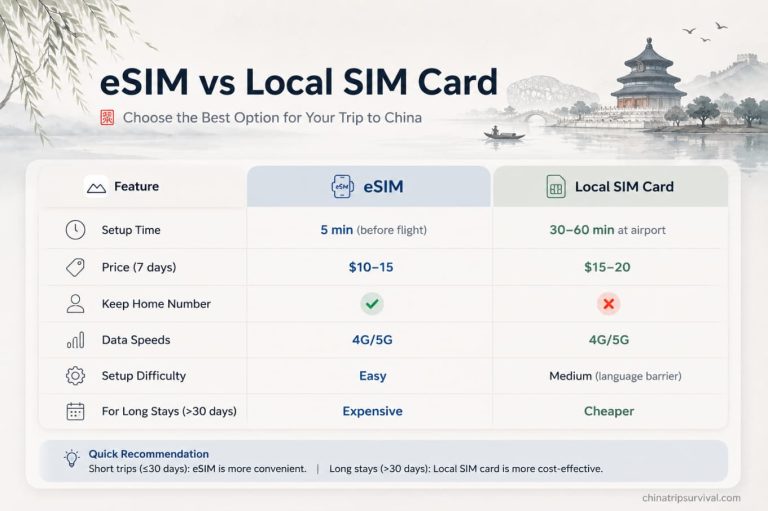
2. Built-in “Great Firewall” Bypass
Most travel eSIMs use international roaming data. This means your internet traffic is routed through servers outside mainland China (like Hong Kong or Singapore), allowing you to access Google and social media without a VPN. VPNs are often unstable and can be blocked at any time; an eSIM is “always on.”
3. No More Lines or Passport Registration
Buying a local SIM card in China requires a physical store visit and a passport registration. With an eSIM, there is no physical card to swap and no paperwork. You can buy it in your home country and have it ready before you land.
4. A Local SIM Demands a VPN
One of the most common misconceptions for travelers is thinking that buying a local physical SIM card at a Chinese airport solves everything. It doesn’t.
When you use a local Chinese SIM card (from providers like China Mobile or China Unicom), your phone is assigned a local IP address. This means you are subject to the same internet restrictions as every resident in mainland China. Even with a local SIM, Google, Instagram, WhatsApp, and Netflix will remain blocked.
To access the global internet with a local SIM, you are forced into a “Double-Hassle” setup:
- Step 1: You must buy and register a local SIM card with your passport.
- Step 2: You may pay for and maintain a high-quality VPN subscription to “jump over” the firewall.
This combination is not only more expensive but also highly unreliable. VPNs in China are in a constant “cat-and-mouse” game with the authorities. They can be slow, drain your battery, and often fail during sensitive periods – for example, during the national Two Sessions each March, internet oversight is tightened, making these unapproved VPN services far less stable or usable..
With an eSIM, you skip this entire mess. Because travel eSIMs use international roaming, they route your data through servers in Hong Kong or other regions where the internet is unrestricted. You get the network of a local SIM with the freedom of a VPN, all in one digital package.
Step-by-Step Guide: How to Set Up Your China eSIM
Using an eSIM is simple, but you need to follow these steps to ensure a smooth connection upon arrival.
Step 1: Check Your Phone’s Compatibility
Before buying, ensure your phone is carrier-unlocked and supports eSIM.
- Quick Check: Dial *#06# on your phone. If you see an EID number, your phone likely supports eSIM.
- Note: Most iPhones from mainland China, Hong Kong, and Macau do NOT support eSIM as they have two physical SIM slots.
Step 2: Purchase Your eSIM
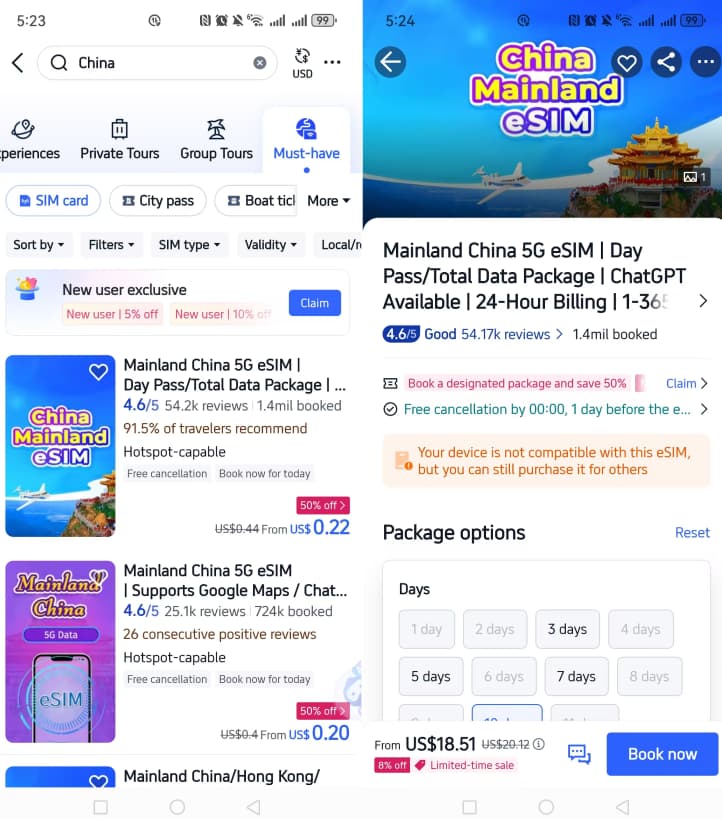
- Open the Trip.com App and search for “eSIM China.” [Buy Now via Trip.com]
- Select a data plan based on your stay (e.g., 50GB for 7 days or Unlimited data).
- Complete the purchase. You will receive an email with a QR Code within minutes.
Step 3: Install the eSIM (Before You Fly)
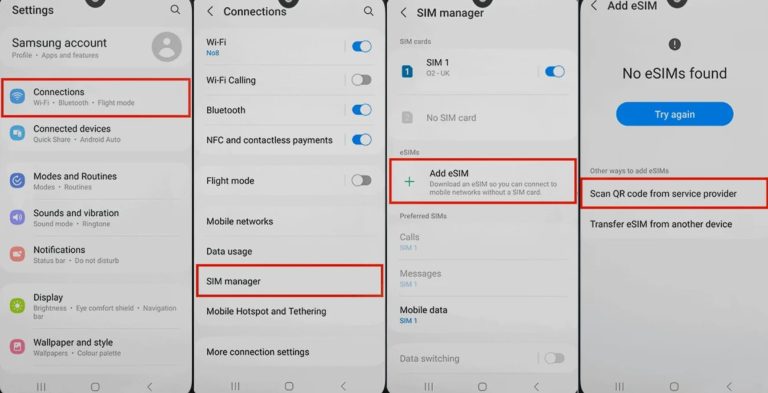
It is best to install the eSIM while you still have a stable Wi-Fi connection at home or at the airport.
- On iPhone: Go to Settings > Cellular > Add eSIM > Use QR Code.
- On Android: Go to Settings > Network & Internet > SIMs > Add > Download a SIM instead.
- Scan the QR code from your email. Label this travel SIM as “China Travel.”
Step 4: Activate on Arrival in China
Once your plane touches down in China:
- Go to your phone’s Cellular settings.
- Turn ON your “China Travel” eSIM.
- Turn ON “Data Roaming” for the travel eSIM.
- Set your “Cellular Data” to use the eSIM.
Common Challenges & Solutions
- “I can’t see the QR code on my phone”: You cannot scan a QR code that is displayed on the same phone’s screen. Print the email or open it on a laptop/another device so your phone’s camera can scan it.
- “My data is slow”: In some remote areas, signal might drop. Try toggling “Airplane Mode” on and off to force the phone to reconnect to the nearest tower.
- “Do I need a VPN as a backup?”: While an eSIM usually bypasses the firewall, it’s always smart to have a free VPN (like ProtonVPN) downloaded as a “Plan B” just in case.
Final Thoughts
For a stress-free trip, the combination of an eSIM for data and Alipay for payments is the ultimate survival kit for modern China. Skip the airport kiosks and the VPN headaches—get your eSIM and stay connected from the moment you land.
Ready for China?
Get your eSIM before boarding your flight. [Check Latest eSIM Price on Trip.com]