Don’t know How to Book and Pay for Ticket on 12306,this page is just for you.
Precondition: Complete Account Registration & Real-Name Verification
After finishing registration and identity authentication (passport ID required for foreigners), follow the full booking & payment process below (operations on 12306 App and official website are nearly identical).
Step 1: Log into Your Verified Account
1. Open the Railway 12306 App or visit kyfw.12306.cn
2. Enter your registered account name + password to log in
3. Optional: Switch to English interface via My → Settings → Language for easier operation
Step 2: Search Available Train Tickets
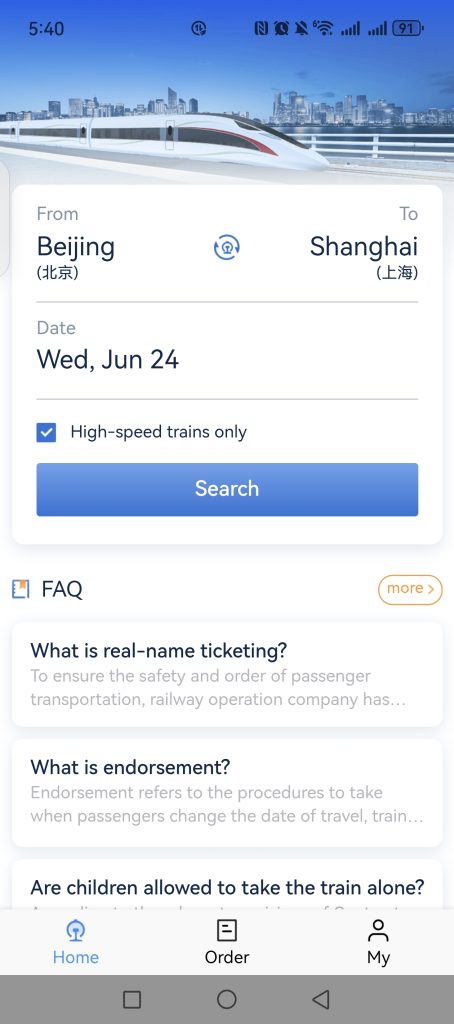
- Tap Ticket Booking on the homepage
- Fill in 3 core information:
- Departure station
- Destination station
- Travel date (tickets are available 15 days in advance in 2026)
- Tick “High-Speed Trains Only” if you only need bullet trains, then click Search Trains
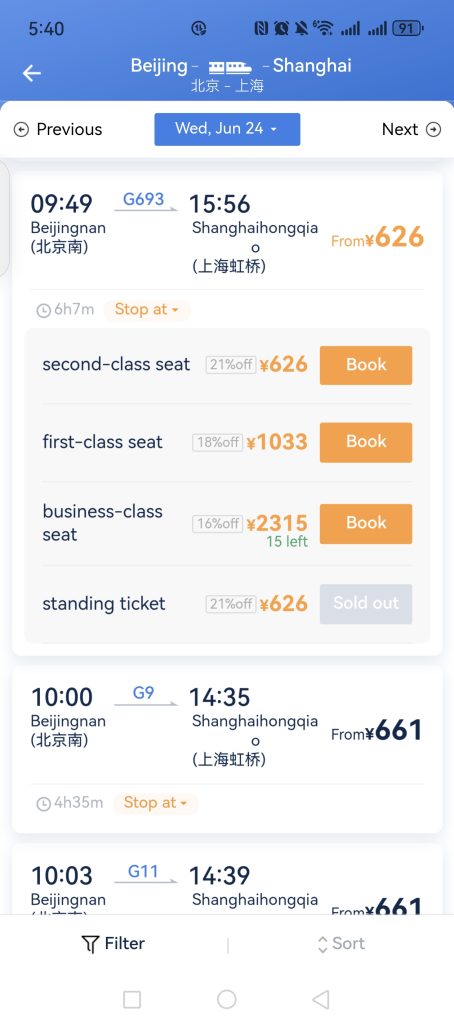
- The page displays all trains with departure time, duration, seat types and remaining tickets
Seat Type Glossary: China High Speed Train Seat Market: Second-Class, First-Class and Business Class
Step 3: Select Train & Submit Booking Request
1. Pick your preferred train and seat class, tap Book
2. Select passengers from the My Passengers list (add passengers with passport info in advance if needed; max 5 tickets per single order)
3. Optional seat preference: choose window or aisle seat in the pop-up window
4. Double-check all passenger names & ID numbers, then click Submit Order
Note: 12306 is incredibly foreigner-friendly in 2026. You don’t need a Chinese bank account.At the payment screen, select Alipay or WeChat Pay. As long as you have linked your foreign Visa or Mastercard to your Alipay/WeChat account (which is standard practice for surviving in China), the payment will process smoothly in seconds.
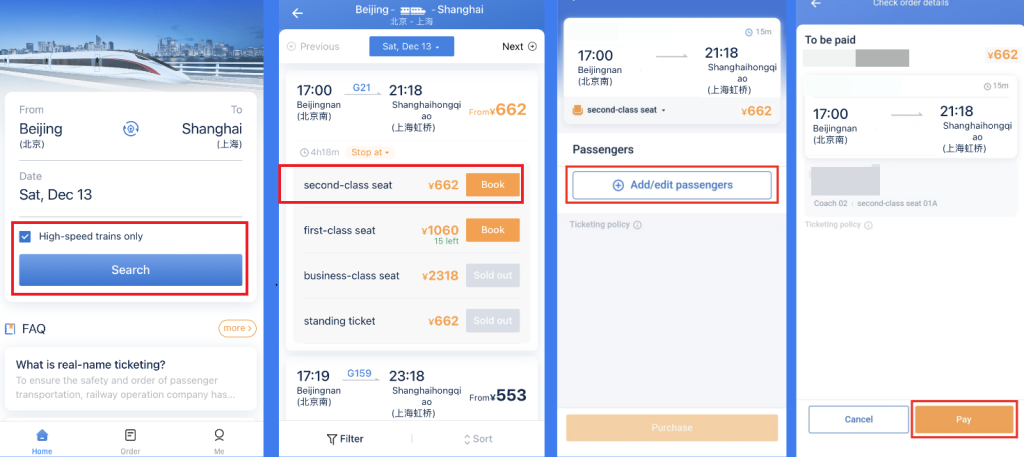
Step 4: Complete Payment Within 30 Minutes (Critical Rule)
Your reserved seat will be automatically released if payment is not finished within 30 minutes after order submission.
1. On the order confirmation page, tap Online Payment
2. Choose one supported payment method (2026 official channels): Alipay / WeChat Pay (most recommended for foreign users with Chinese payment accounts)
3. Follow system redirect prompts: Alipay/WeChat: Scan QR code with payment App to settle
4. Confirm payment success page pops up; save your e-ticket order number
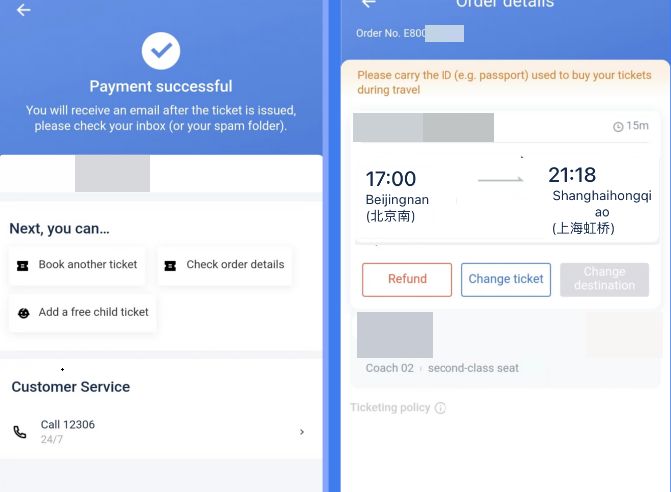
Step 5: After Successful Payment
1. You will receive SMS/email notification with e-ticket information
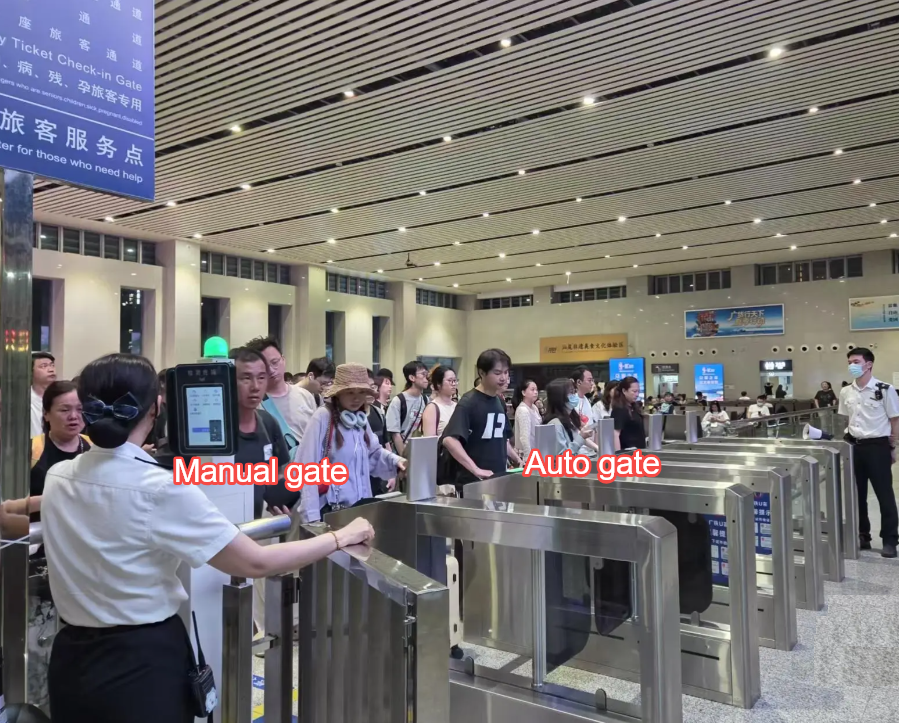
2. Boarding rules in 2026 for Foreign passengers: Carry your original passport to swipe at automatic gate or manual channel directly (no paper ticket required)
3. You can view, reschedule or refund tickets in Order menu.
Reminder: One valid ID can only buy one ticket for the same train & travel date! And service hours for ticket sales: 05:00 – 01:00 next day; every Tuesday 05:00 – 24:00
Pro Tips for Riding the High-Speed Train
Now that you have your ticket, here is what you need to know about boarding:
- There Are No Paper Tickets! Don’t look for a ticket counter to print anything. Your passport is your ticket.
- Arrive Early: Chinese high-speed train stations (like Shanghai Hongqiao) are the size of international airports. Arrive at least 45 minutes to 1 hour before departure to navigate security and find your boarding gate.
- How to Enter: When passing security and boarding gates, use the manual counter if you’re traveling with a passport — automated e-gates might not read foreign passports.
- Onboard Meal Delivery Service: High-speed trains offer convenient food delivery. You can pre-order meals via the official 12306 app; railway staff will bring your food straight to your seat once you board.How to order meal on China high speed train?
6 thoughts on “How to Book and Pay for Ticket on 12306 (2026 Full Step-by-Step Guide)”
Comments are closed.